

How to Replace the Garmin StreetPilot C330 Battery
When a Garmin StreetPilot C330 will not stay powered off the charger, the fix is usually a fresh compatible cell. US owners of these larger dashboard units can keep the familiar screen and mounts by fitting a brand new compatible pack instead of buying a new navigator.
- The StreetPilot C330 is a bulkier unit with a rear compartment that holds the cell.
- Confirm the exact model on the bottom label before you order any part.
- Short runtime and a dim screen are the earliest signs of a worn cell.
- A full first charge and a test drive verify the new pack works.
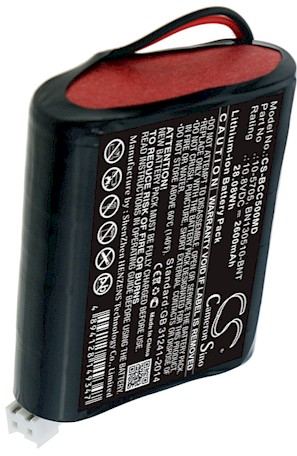
Confirm the model and set up your workspace
If you are asking how to replace a Garmin StreetPilot C330 battery, begin with the label on the underside of the unit. StreetPilot models are larger than the slim Nuvi line and often keep the cell behind a dedicated rear door, so the part you need is specific to this body style. Write down the model name and the number printed on the old cell before you shop.
A tired pack shows up as a unit that works fine on the car adapter but quits the moment you unplug it. You may also see the backlight fade early or the device lose its settings overnight. Set up a clean table with a small Phillips screwdriver, a plastic pry tool, and a dish for screws, and disconnect the Garmin StreetPilot C330 from any power source first.

Opening the rear battery compartment
On the StreetPilot C330, the battery usually sits behind a small panel on the back rather than under the whole housing, which makes access simpler than on many handheld units. Remove the screws holding that door and lift it straight off, taking care not to tug any ribbon cable attached to the cover. Note how the old cell sits and where its lead runs before you disconnect anything.
Unplug the connector by holding the plastic housing, not the wires, since a torn lead turns an easy job into a repair. If adhesive holds the cell, ease it up with a plastic tool and keep metal pry bars away from the contacts. Keep the old pack so you can compare its shape with the replacement.
Fitting the new pack and the first charge
Seat the aftermarket replacement battery pack in the same direction as the original and press the connector in until it clicks. The Li-ion battery pack should rest flat with no strain on the lead. Refit the door, tighten the screws evenly, and leave the Garmin StreetPilot C330 on the charger until it reaches a full charge before you test it on the road.
New cells commonly arrive with only a partial charge for safer transport, so that first full charge matters. Afterward, run the unit on battery power for a familiar drive and watch the runtime. If it fades quickly, reopen the door and check that the plug is fully seated, or reach our support team through the Contact Us page.
Recycling the old cell and next steps
Take the old cell to a US rechargeable battery drop-off instead of the household trash, and tape the connector first. If the panel will not sit flush or the unit stays dark after charging, stop rather than forcing it and let our team help. A compatible replacement pack and the correct charger bring the StreetPilot back to daily use.
Find the right replacement battery
Find compatible replacement battery packs and chargers for your dashboard GPS and get the StreetPilot navigating again.
Frequently asked questions
Is the StreetPilot C330 harder to open than a Nuvi?
Not really, and in some ways it is easier, because the cell usually sits behind its own rear door instead of under the full housing. Take your time with the small screws and note the cable routing, and the job stays manageable for a careful beginner.
Why does the unit work on the car adapter but not on battery?
That is the classic sign of a cell that can no longer hold a charge. The adapter powers the unit directly, so it runs fine until you unplug it, while the worn pack drops voltage almost immediately. A fresh compatible cell restores normal cordless runtime.
Should the new pack be charged before its first use?
Yes, give it a complete charge before you rely on it, because replacement cells are shipped at a low state of charge for safe transport. A full first charge also helps the electronics report runtime accurately, so you get a trustworthy reading from the start.
Related reading
Last reviewed by the batteries-company.com editorial team. Brand and model names are used to describe compatibility only; replacement packs are aftermarket products.
Editorial source: Q&A Collection 022 — “How do I replace the Garmin StreetPilot C330 battery” (FAQ #118). See the full collection-to-article map.

 Warehouse address: