


A Practical Guide to Garmin Nuvi 765T Battery Replacement
A tired battery is the usual reason a Nuvi 765T quits before the drive is over, and swapping in a fresh pack is straightforward with the right part. This guide walks you through confirming the model, opening the case, and getting back to reliable turn-by-turn navigation.
- A weak 765T battery shows up as short runtime and sudden shutdowns on longer drives.
- Confirm the exact model and part number on the label before ordering any replacement pack.
- A small Phillips screwdriver, a plastic pry tool, and a clean workspace are all you need.
- Give the new pack a full first charge, then test real-world runtime before a long trip.
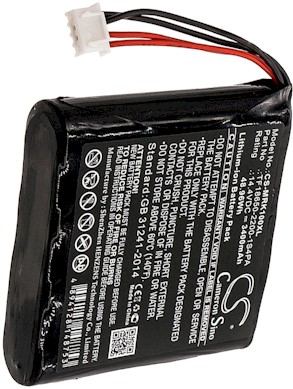
Signs the battery in this Nuvi is wearing out
The first clue is runtime that keeps shrinking. A unit that once lasted a full day now barely gets you across town before the low-battery warning appears. The screen may dim, it may shut down with traffic on, or refuse to start unless plugged in. Those are classic signs of an aging Li-ion pack that no longer holds a full charge.
Before you buy anything, confirm you have the right unit. Check the model label on the back or bottom and compare it with the part number on the original battery. The T means a built-in traffic receiver, and the 7xx series uses a different pack from the smaller Nuvi units, so match the exact number rather than guessing by size.

Tools and a safe workspace for the swap
Set up on a clean, well-lit table with a soft cloth under the unit. You will need a small Phillips screwdriver, a plastic pry tool, and a steady hand. Power the unit off completely and unplug it before you start, because Li-ion cells should never be pried while the device is live. Keep the screws in a small dish so none go missing.
Remove the back cover screws and gently work the pry tool around the seam until the case releases. Lift the old pack out slowly, then unplug its connector from the board by pulling on the plug rather than the wires. Note how the cable is routed so the new pack sits the same way, and avoid touching any exposed contacts with metal tools.
Fitting the new pack and testing runtime
Seat the replacement connector, tuck the wires into the same channel, and press the new pack into place before replacing the cover and screws. Give the unit a full first charge before judging it; a brand new cell often needs a complete cycle to report its true capacity. Then run it on battery power for a typical drive and watch how long it lasts.
If you are still deciding where to buy a replacement Garmin Nuvi 765T battery in the USA, choose a listing that names this exact model and shows the compatible part number. Recycle the old Li-ion pack at a local battery drop-off rather than tossing it in the trash, since rechargeable cells do not belong in household waste.
When to ask for help
If the new pack will not seat, the connector looks different, or the unit still dies after a full charge, stop and contact our support team through the Contact Us page. A quick check of your model number against the compatibility list usually clears things up, and your purchase is covered by a 30-day money-back guarantee and a 1-year warranty.
Find the right replacement battery
Browse our compatible replacement battery packs and chargers for the Garmin Nuvi 765T, and get back to confident navigation with a brand new pack.
Frequently asked questions
How long should the original battery last?
Most owners see a few years of solid service before a Li-ion pack starts to fade. Heavy use of traffic and Bluetooth, plus frequent heat from a car dashboard, shortens that span. When runtime drops to a fraction of what it used to be, a fresh replacement is the practical fix.
Can I use a higher-capacity pack in this model?
Stick with a pack that matches the original voltage, chemistry, and connector shape. A higher mAh rating can add runtime if the case and electronics support it, but never substitute a different voltage. Check the compatibility list on the product page or ask our team before ordering.
Do I need to calibrate the battery after installing it?
A full first charge followed by one normal run-down helps the fuel gauge read accurately. After that, everyday top-ups are fine and you do not need to drain the pack each time. If the percentage still jumps around after two cycles, reach out through the Contact Us page.
Related reading
Last reviewed by the batteries-company.com editorial team. Brand and model names are used to describe compatibility only; replacement packs are aftermarket products.
Editorial source: Q&A Collection 007 — “How do I replace the Garmin Nuvi 765T battery” (FAQ #104). See the full collection-to-article map.
 Warehouse address: