


How to Replace a TomTom Go 630 Battery
When a TomTom Go 630 stops holding a charge, the fix is a fresh compatible pack rather than a whole new unit. A careful swap takes common tools, and it keeps your maps, favorites, and mount exactly where you left them.
- The GO series shares a familiar internal layout, which makes the swap predictable.
- Match the part number on the rear label before ordering any replacement cell.
- Mild warmth while charging is fine, but a swollen or dented pack is not.
- Log one full drive on battery power to confirm the new runtime.
Confirm the Model and Gather Your Tools
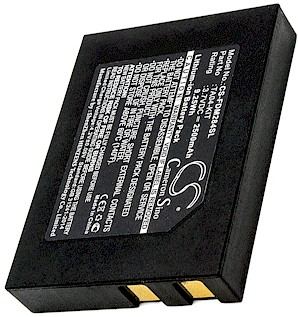
Start by turning the unit over and reading the small label on the rear housing, because the TomTom Go 630 shipped in a few hardware revisions. Write down the model name and the battery part number exactly as printed. Set a soft cloth, a small Phillips screwdriver, and a plastic opening tool on a clean, well lit table before you begin.
If you have been searching how to change the battery in a TomTom Go 630, that part number is the single detail that keeps the order on track. The GO line is roomier than the later ONE models, so there is a bit more space to work once the back is off. Keep a dish handy for the screws and work unplugged throughout.

Signs the Original Pack Is Fading
A tired cell rarely fails all at once. The TomTom Go 630 may show a full icon, then drop to empty within minutes of leaving the car adapter, or it may reboot whenever the mount hits a bump. Those are the everyday clues that the pack has used up most of its charge cycles and is ready for retirement.
Slide the opening tool gently along the case seam and ease the halves apart, since the GO housing relies on clips as well as screws. Work around the edge rather than prying hard in one corner. Once the back lifts free, you will see the small connector linking the old cell to the board.
Disconnect the Old Cell and Fit the New Pack
Lift the connector with the plastic tool instead of pulling on the wires, then coax the spent cell out of its adhesive bed. Seat the fresh compatible pack in the same orientation and press the plug home until it is flush. A properly matched aftermarket replacement battery pack should drop into the TomTom Go 630 without any trimming or tape.
Before you close the case, reconnect everything and give the unit a full initial charge with the screen off. Warmth at the terminals during that first charge is normal and nothing to worry about. Let it reach full, then snap the housing back together and tighten the screws evenly.
Test Runtime, Recycle, and Ask for Help
Run the navigator on battery power alone through a normal drive and note how long it lasts; that figure is your real world proof. Take the old cell to an electronics drop off instead of the household trash. If the plug will not seat or runtime still disappoints, contact our support team before forcing anything.
Find the right replacement battery
Explore compatible replacement battery packs and chargers for TomTom navigators, and pick the right fit before your next road trip.
Frequently asked questions
Will a new pack work with my existing mount and charger?
Yes, a compatible replacement is built around the same footprint and connector as the original, so your suction mount, car adapter, and home cable keep working. Nothing about the swap changes how the unit sits in the car or syncs. Just confirm the part number before you order.
Is it normal for the pack to feel warm while charging?
A mild warmth during the first full charge and normal use is expected, especially with the screen on. What is not normal is swelling, a sharp odor, or a case that will not close. If you notice any of those, stop using the unit and get in touch right away.
Should I drain the new battery completely first?
No, lithium based packs do not need a deep drain, and repeatedly running one to empty shortens its life. A full initial charge followed by ordinary use is plenty. Save your attention for the measured runtime of a typical drive rather than an old style conditioning routine.
Related reading
Last reviewed by the batteries-company.com editorial team. Brand and model names are used to describe compatibility only; replacement packs are aftermarket products.
Editorial source: Q&A Collection 011 — “How do I replace the TomTom Go 630 battery” (FAQ #108). See the full collection-to-article map.
 Warehouse address: