

A Practical TomTom Go 930 Battery Replacement Guide
A fading battery means the internal Li-ion cell is worn out, not that the navigator is finished. If you are searching for how to replace a TomTom Go 930 battery, a new compatible pack restores portable runtime and saves you the cost of a whole new unit.
- A TomTom Go 930 that dies off the charger is showing a worn internal Li-ion cell.
- Confirm the exact model and part number on the back label before you order.
- Work on a clean, well-lit surface with a plastic pry tool and small driver.
- Give the new pack a full first charge, then time a real drive to test runtime.
Spotting a Tired TomTom Go 930 Battery
The first clue is usually runtime. A healthy TomTom Go 930 stays on for a reasonable stretch away from the car adapter, but a tired one drops to a blank screen within minutes of being unplugged. You may also notice the charge indicator never quite fills, or that the unit resets itself on a bumpy road. Those are classic signs of a cell that has lost capacity.
It is worth ruling out the charger before you open anything. Plug the unit into a known-good car adapter or wall charger and let it sit; if it still will not hold a charge, the pack is the culprit rather than the power lead. Temperature plays a part too, since a cold Li-ion cell briefly delivers less current. Confirm the diagnosis once, then gather what you need for the swap.

Confirm the Model and Gather Your Tools
Flip the unit over and read the small label on the back; the exact model name and the part number of the original pack are printed there. On the TomTom GO family this label sits near the serial sticker, and matching it to your order is the single best way to avoid a connector that does not fit. Take a quick photo so the numbers stay handy while you shop.
You will want a clean, well-lit table, a small Phillips driver, a plastic pry tool or guitar pick, and a soft cloth to protect the screen. Set the screws aside in a little dish as they come out. Avoid metal prying, which can short a contact or scar the casing, and give yourself more space than you think you need.
Swapping the Cell Inside the TomTom Go 930
Power the unit off and lay it face down on the cloth. On the TomTom Go 930 the rear case is held by a few small screws, some of them tucked under the rubber pads, so peel those back gently and keep track of where each screw came from. Ease the pry tool around the seam until the clips release, then lift the cover rather than pulling.
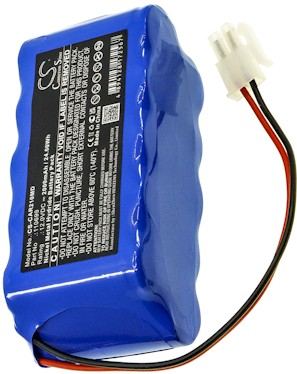
Unplug the small white connector by gripping the plug, never the wires, and lift the old cell out of its recess. Seat the new pack in the same orientation, press the connector home until it clicks, and tuck the lead back along its channel. Before closing, switch the unit on to confirm it sees the battery, then snap the case together and refit the screws.
Test, Recycle, and Know When to Call Us
Give the new pack a full first charge, then take the navigator on a normal unplugged drive and time how long it lasts. Recycle the old cell at a local battery drop-off instead of the household trash. If a connector will not match or the case will not sit flush, stop and reach our team through the Contact Us page.
Find the right replacement battery
Browse compatible replacement battery packs and chargers for the TomTom Go 930 and give your navigator a fresh start.
Frequently asked questions
Will any slim GPS battery fit this model?
No. Packs differ in connector shape, polarity, and thickness even when two units look alike from the outside. Match the part number printed on the original cell or the back label, and choose a pack listed for the TomTom GO series so the lead reaches and the case closes.
Do I have to charge the new pack before using it?
Yes, and it is worth the wait. Aftermarket cells ship with a partial charge, so a full first cycle helps the electronics report runtime accurately. Expect capacity to settle in over the first two or three charges before you judge how the pack performs.
What should I do with the old cell?
Take it to a household hazardous waste site or a retail battery drop-off. Tape the contacts first so it cannot short in a bin. Recycling keeps the cell's metals out of a landfill and is the responsible last step once a replacement is installed and working.
Related reading
Last reviewed by the batteries-company.com editorial team. Brand and model names are used to describe compatibility only; replacement packs are aftermarket products.
Editorial source: Q&A Collection 010 — “How do I replace the TomTom Go 930 battery” (FAQ #107). See the full collection-to-article map.

 Warehouse address: